Floor software for cannabis manufacturers

Get your floor off the spreadsheet.

Batches, pots, COAs, labels and LeafLink orders in one place, with a real cost on every batch and a heads-up before an account goes quiet. Your crew logs each step on a shop tablet as they do it, so you stop chasing it down at the end of the shift.

30 days free. No credit card to start.

One batch in the Toru5 demo workspace: every station, who did it, what it weighed, what it cost.

Off the spreadsheet

Stop copying the batch sheet into three places.

Your crew logs each step where the work happens: weights at the scale, socks at the pot, counts at packaging. Everyone sees the same batch, and nobody retypes it later.

01 · Intake

Never type the tag twice.

  • Pull tags, grower and license from the Metrc manifest instead of retyping them.
  • The batch number is assigned for you, and the intake label prints when you save.
  • Find any batch later by ID, strain or grower.
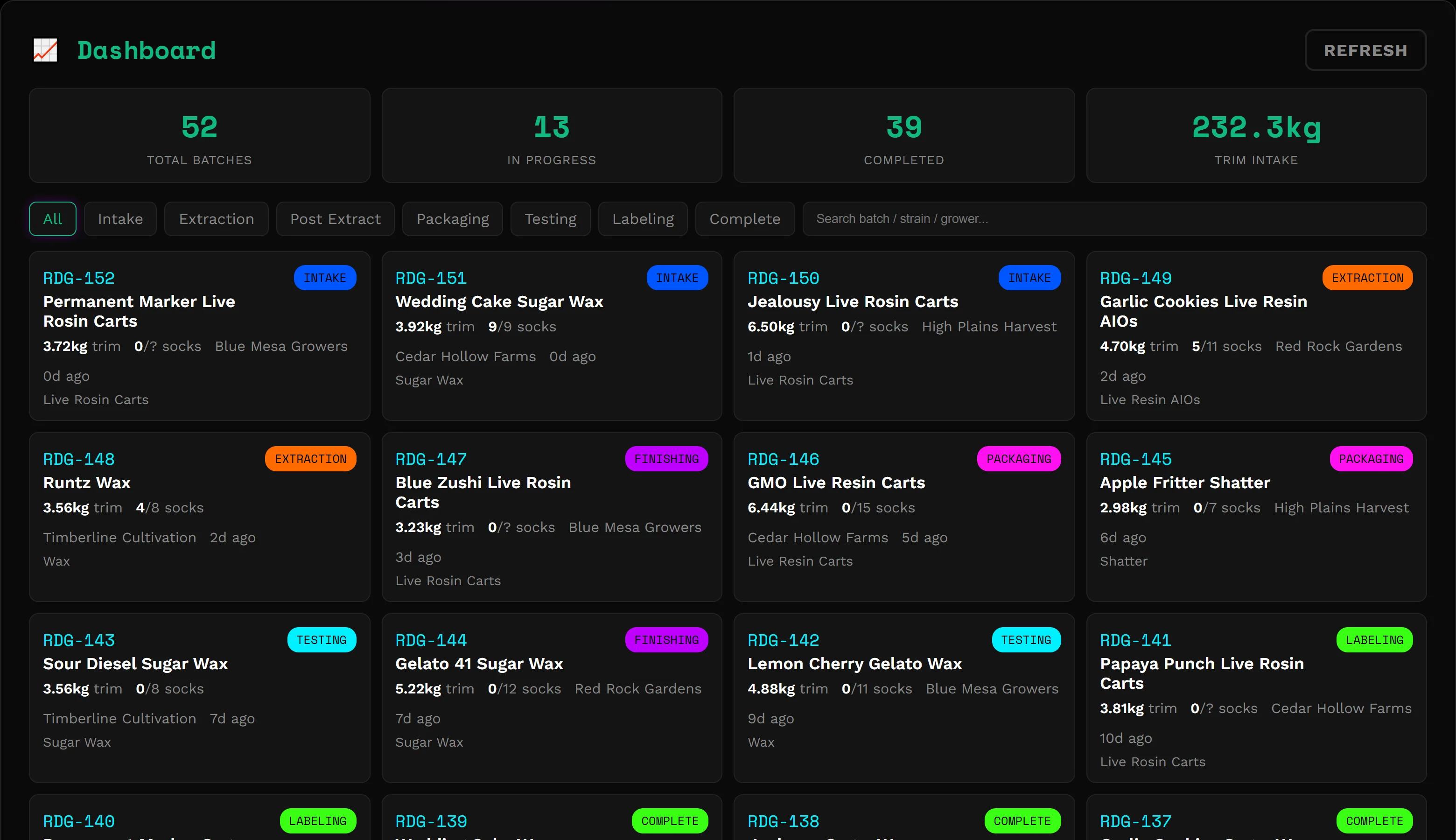
Toru5 dashboard listing batches with IDs, strains, trim weights, sock counts, growers and their current station
Dashboard · demo workspace

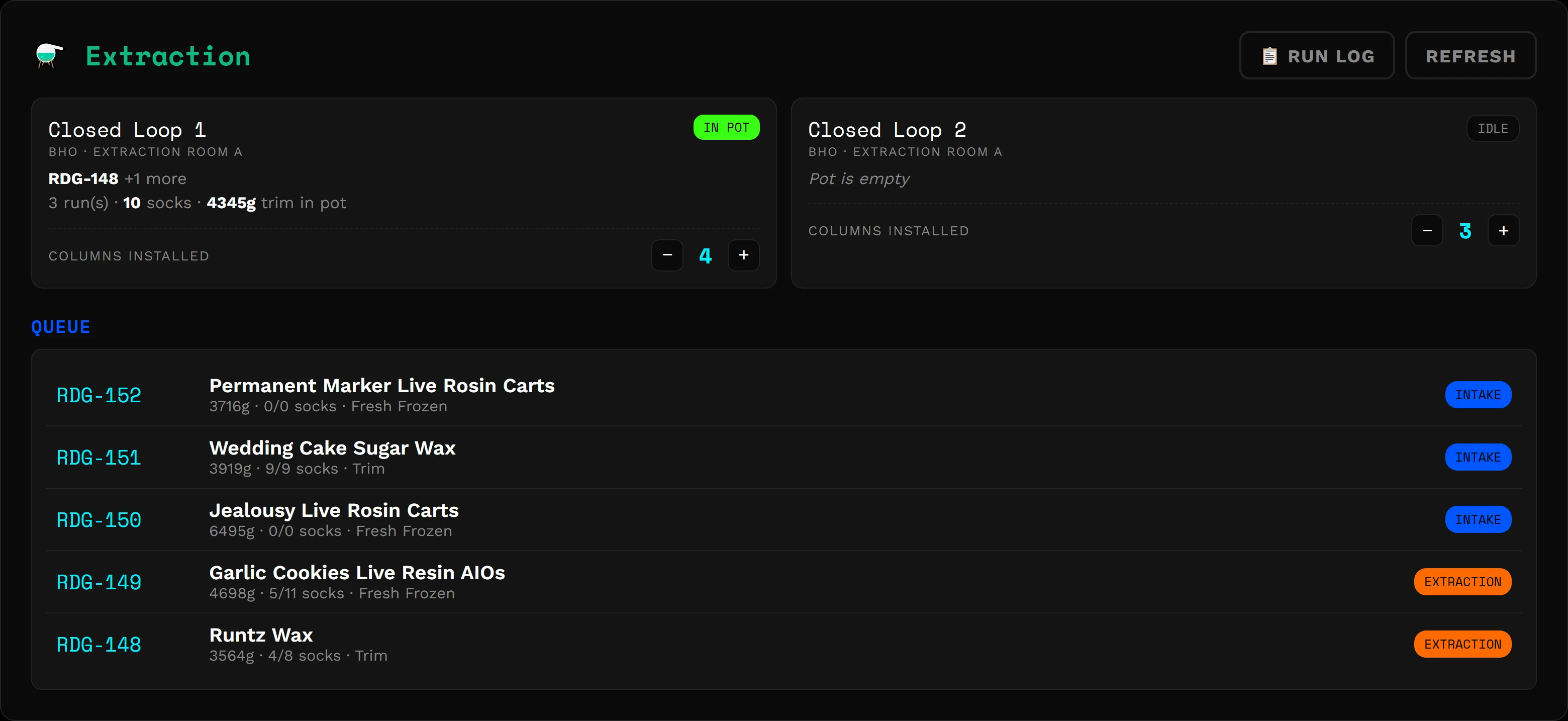
02 · Extraction

Know what's in the pot without walking over.

  • Load socks and Toru5 keeps the pot ledger: which batches, how many socks, how much material.
  • Loaded the wrong run? Undo it. Every run lands in the run log.
  • Running solventless? Wash yields by micron, freeze-dry weights, press temp and time.
Extraction station showing two closed-loop machines, one with batches in the pot, and a queue of batches waiting
Extraction · demo workspace

03 · Finishing & packaging

Tell sales when it'll be ready, and be right.

  • Final, sample and net weights at finishing. Split or combine batches and the lineage stays attached.
  • Packaging counts by size. Bulk sales skip labeling.
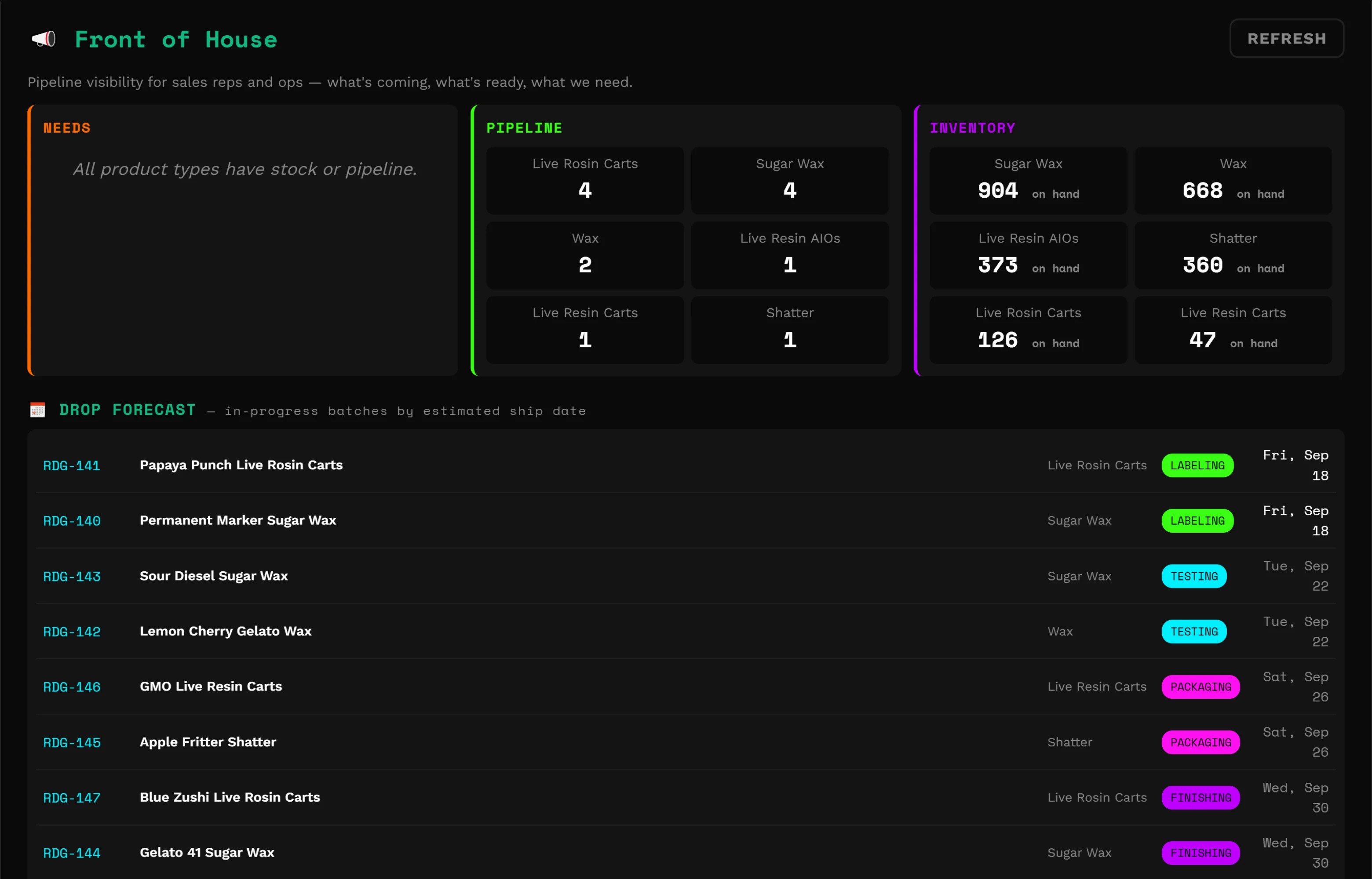
  • Front of House shows what's in the pipeline and estimated ship dates for what's coming up next.
  • Pause a job mid-task and pick it back up when you log in.
Front of House board with pipeline counts and on-hand units by product, and a drop forecast listing batches with estimated ship dates
Front of House · demo workspace

04 · Testing

The COA lives with the batch, not in someone's inbox.

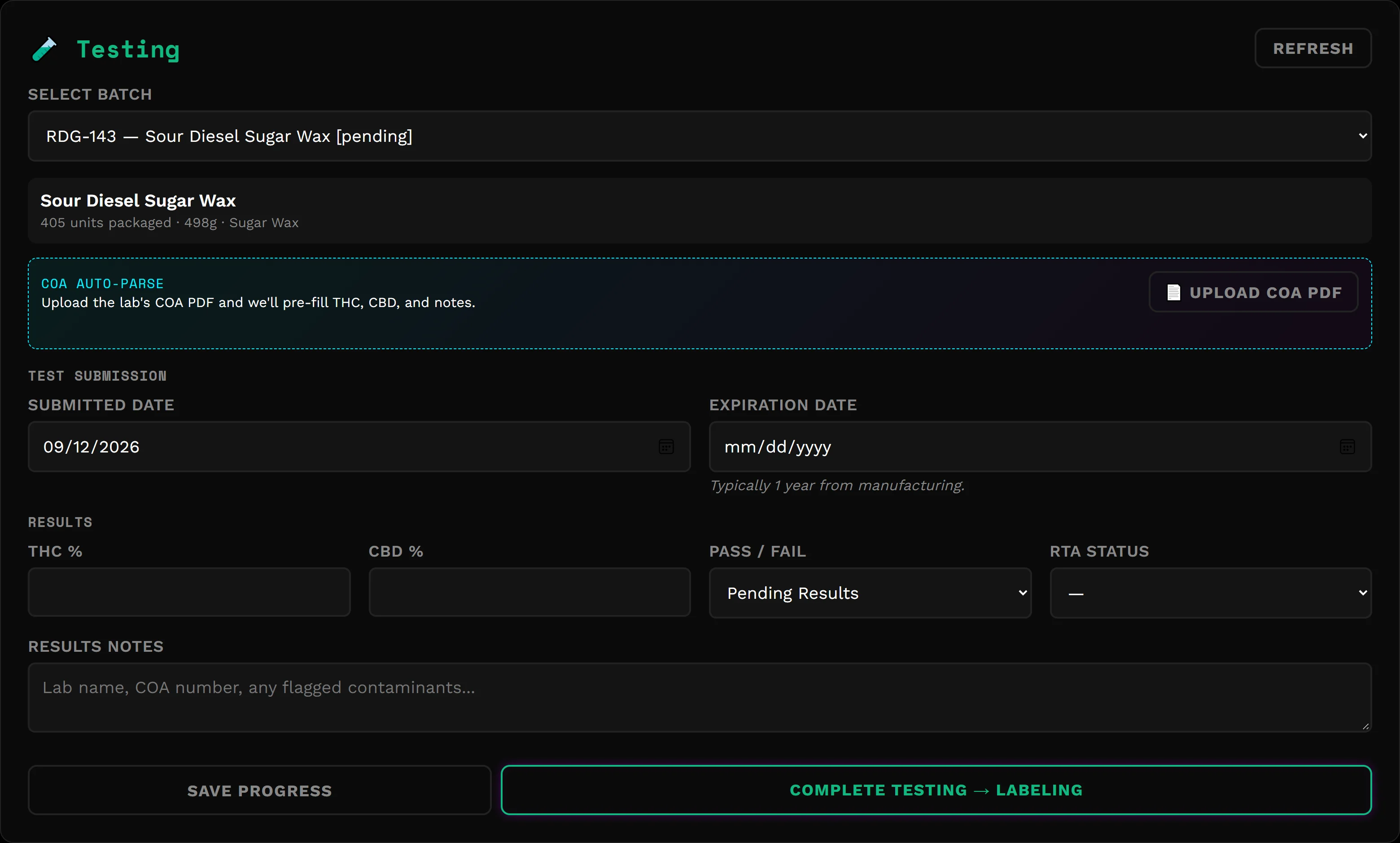
  • Upload the lab's PDF and THC, CBD and the COA number fill in.
  • Pass or fail, expiration and RTA status stay on the batch, and RTA streaks are tracked by product type.
  • Spent material goes into the waste log on its own when a batch leaves extraction.
Testing station for a sugar wax batch with a COA PDF upload, submission and expiration dates, and result fields
Testing · demo workspace

05 · Labeling

Counts that add up before anything ships.

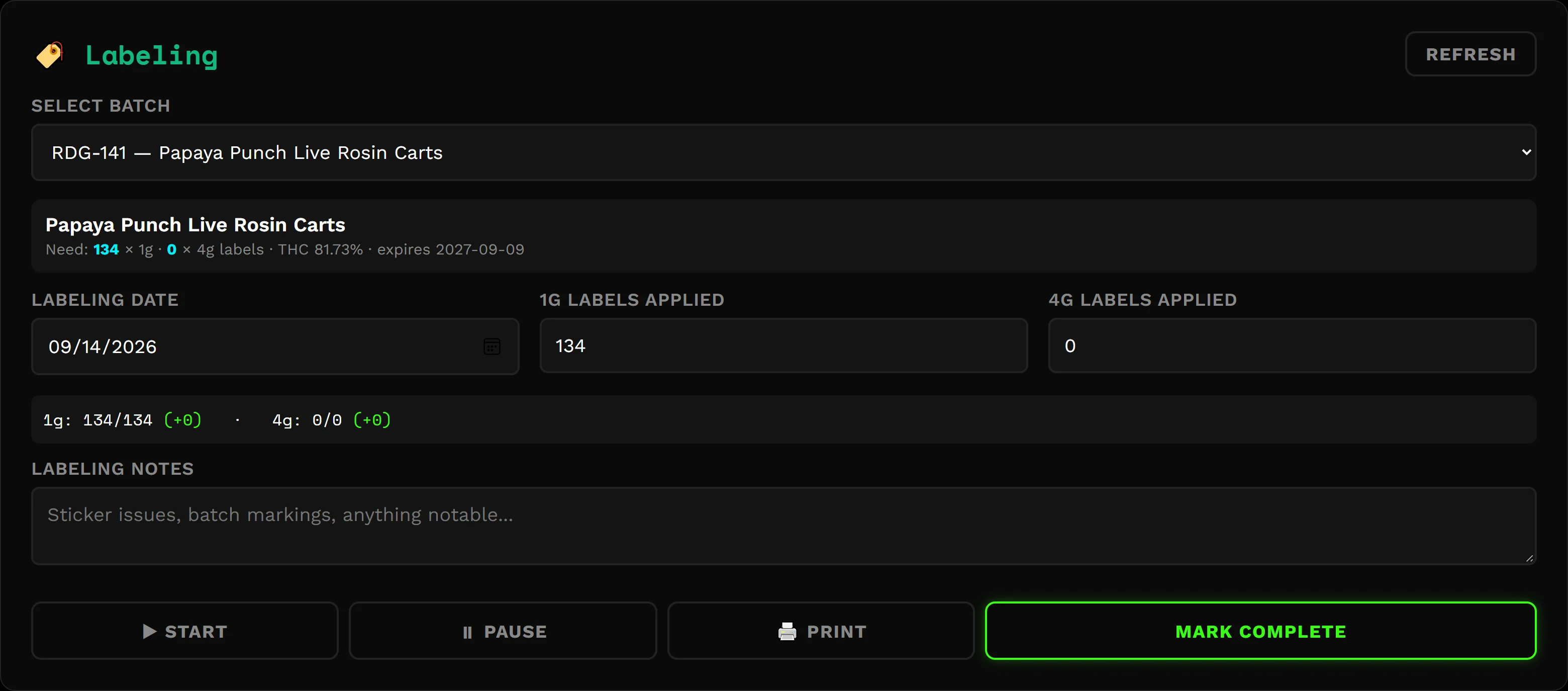
  • Labels applied are checked against units packaged. A mismatch has to be signed off.
  • Jars, lids, hardware and labels come off your supply counts when labeling is done.
  • Map each product and size to its LeafLink listing once. Approving a finished batch lists it at your case price, with 1g and 4g as separate listings.
Labeling station showing labels needed, labels applied for 1g and 4g units, and pause, print and complete controls
Labeling · demo workspace

What every batch cost

Know which products make you money.

When a batch finishes, Toru5 prices it with your rates: material, labor, butane, packaging and a share of overhead. Business Analytics lines that up against what sold, by product and by strain. No cost sheet to keep in sync.
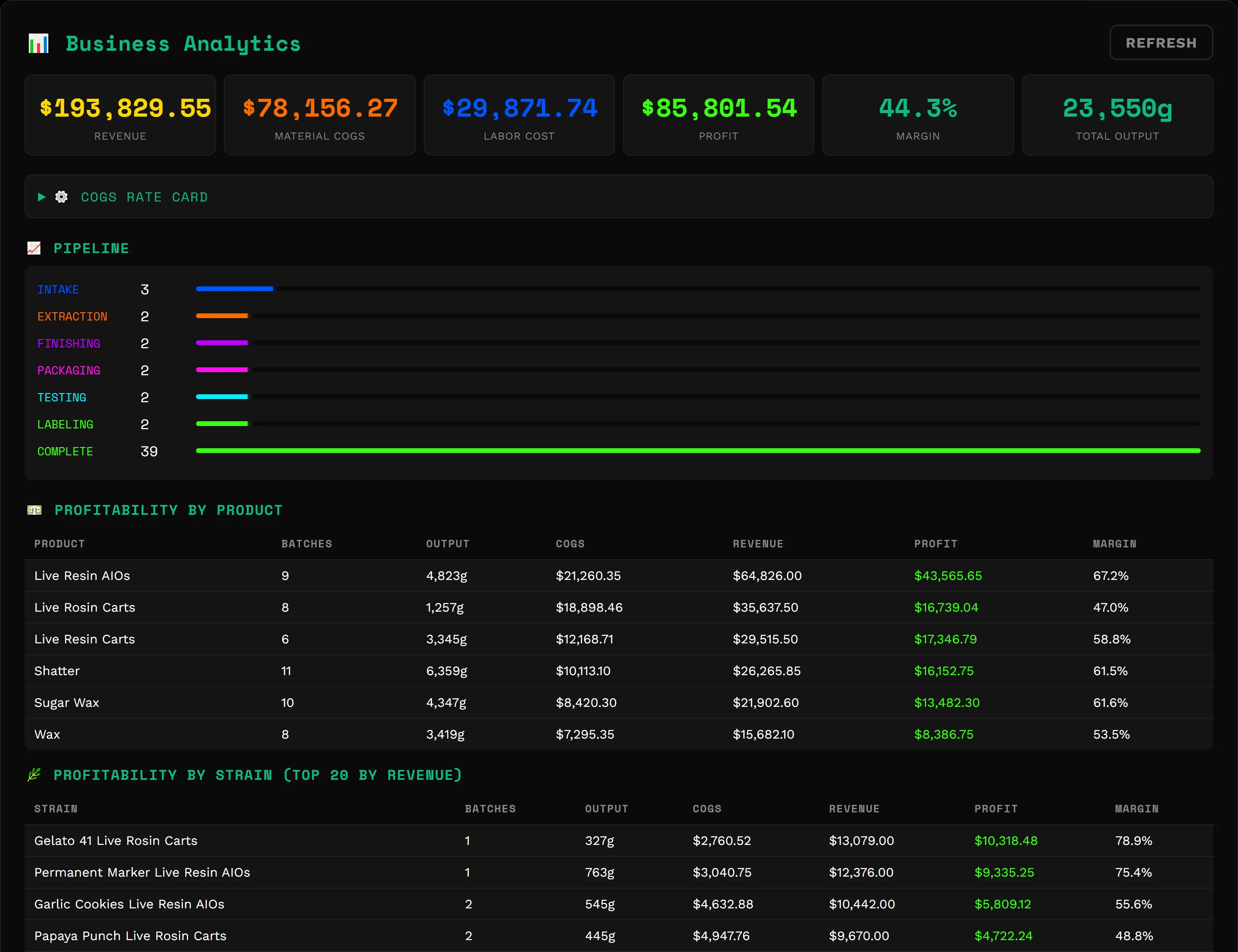
Business Analytics showing revenue, material cost, labor, profit and margin, a pipeline by stage, and profitability by product
Business Analytics · demo workspace
Cost per unit

Set your rates once. Change one and recalculate past batches.

Profit by product

Each sale counts once, against the product and strain it came from.

Days of supply

Units sold in the last 30 days against what's on hand in LeafLink, so you know what to run next.

The briefing

Your morning walk-through, on one page.

What got packaged this week, which batches haven't moved in three days, crew hours, revenue, and what's below its reorder point.
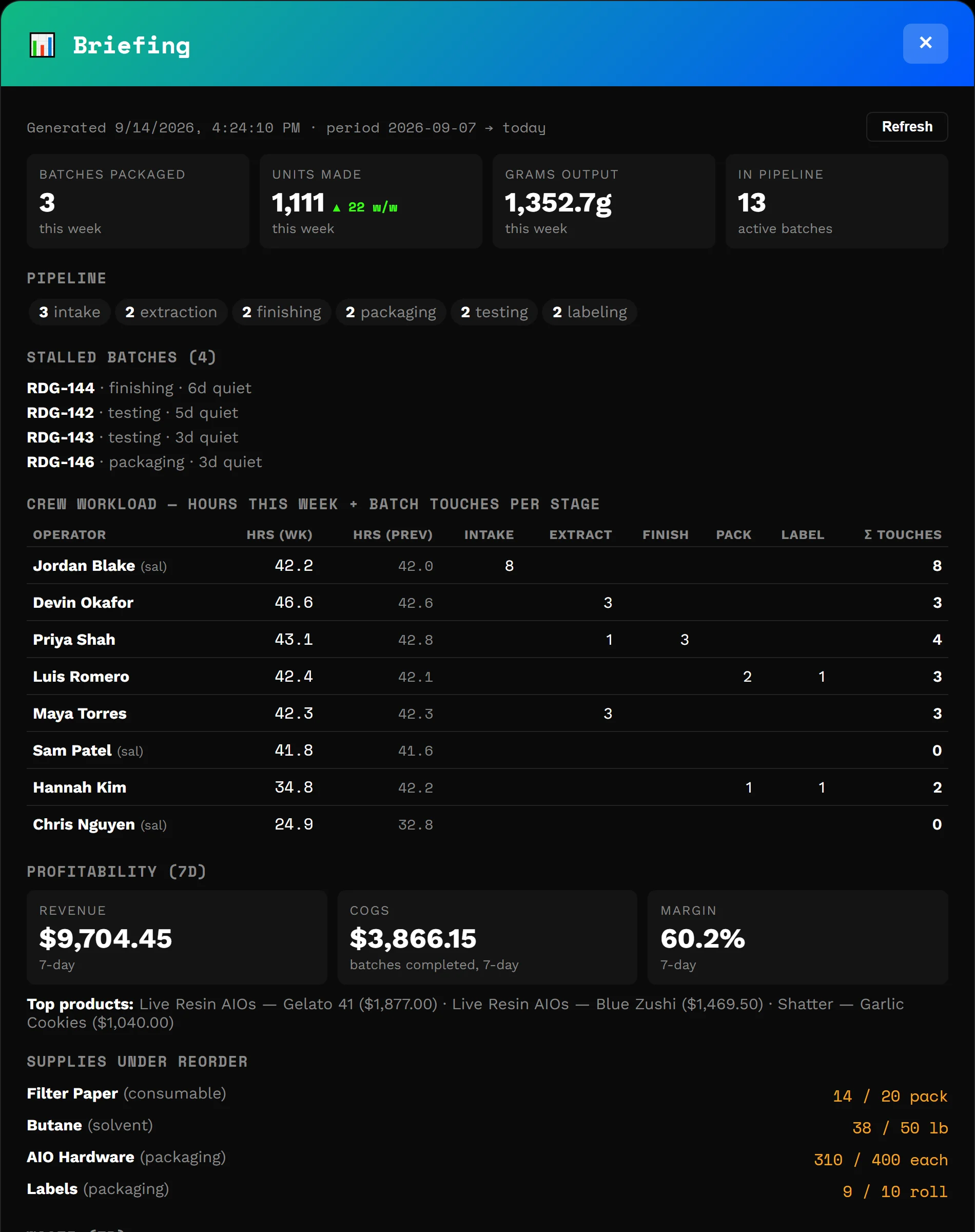
Briefing with batches packaged and units made this week, pipeline by stage, stalled batches and a crew workload table
Briefing · demo workspace

What's ready and who to call

Catch the reorder before they buy from someone else.

When you sync LeafLink orders, Toru5 sets up an account for each store that's bought from you in the past year and keeps its order history current. Reps open Rep Hub and see who to call first.
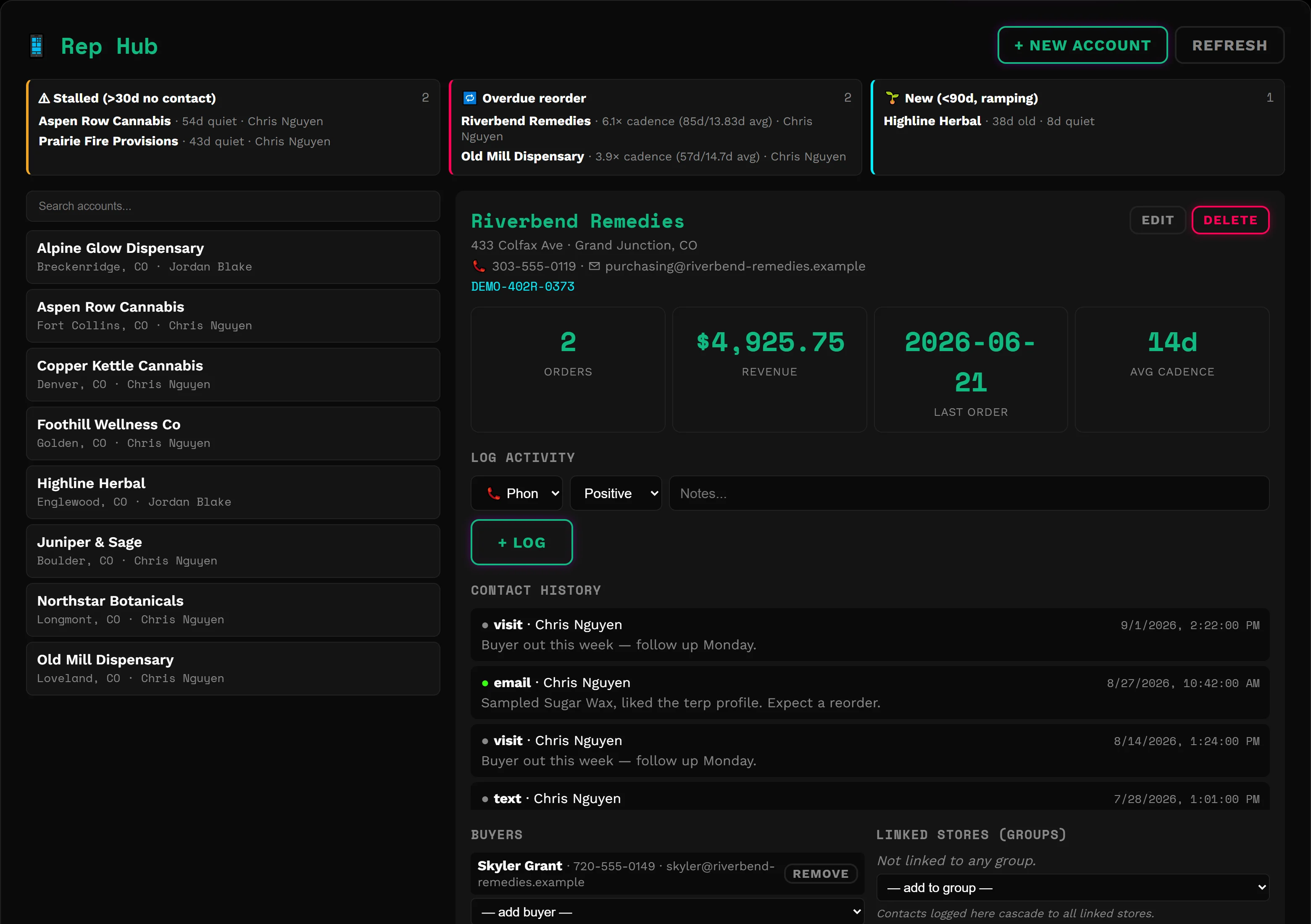
  • Overdue reorders: flagged when a store goes well past its usual time between orders.
  • Quiet accounts: flagged after 30 days with no call, text or visit logged.
  • Accept submitted orders, and see paid, unpaid and overdue invoices plus commission on paid invoices.
  • Log calls, texts and visits against the account so the next rep has the history.
Rep Hub with stalled, overdue-reorder and new account panels, and an overdue account open showing its order cadence and contact history
Rep Hub · demo workspace

Why switch

Why not just a spreadsheet? Why not a big ERP?

Instead of a spreadsheet

A sheet only knows what someone typed in later.
Toru5 records each step at the station, with who did it and when.
Costing a batch means building formulas and keeping them right.
Toru5 prices every finished batch from your rates.
A sheet won't tell you an account has gone quiet.
Rep Hub flags overdue reorders from your LeafLink history.

Instead of a big ERP

General-purpose systems start from inventory and accounting.
Toru5 starts from the floor: pots, socks, washes, COAs and labels are built in, not custom fields.
Getting live can mean an implementation project.
Toru5 sets up through an 11-step wizard you run yourself.
Crew logins and training slow everyone down.
Your crew logs in with a PIN on a shop tablet and works their own station.

Toru5 isn't your accounting system, and some integrations are still being built. See what works today.


Around the shop

The rest of the shop, same login.

Time clock and payroll

Crew punch in with their PIN, and you can lock punches to your shop's network. Daily and weekly overtime, sick days and manual shifts are handled, and payroll exports to CSV.

Supplies and waste

Reorder points, suppliers and costs for every supply, with anything low highlighted. Waste entries with tags and disposal method, exportable to CSV.

Crew and access

Admin and staff roles, station views per person, and a login history that shows failed PIN attempts.

Your name on it

Your app name, logo and color on every screen. Each company's records are kept separate, and integration keys are stored encrypted.


What's live

What works today, and what's still being built.

Live now

  • Intake, extraction, solventless, finishing, packaging, testing and labeling stations
  • Pot ledger, run log, split and combine, pause and resume
  • COA upload, RTA streaks and the waste log
  • LeafLink order pull, order acceptance, product mappings and listing push
  • Rep Hub accounts built from LeafLink, with overdue-reorder and quiet-account flags
  • Metrc manifest import at intake
  • Batch costing, Business Analytics, days of supply and the briefing
  • Time clock, payroll export, supplies and permissions

In development

  • Full Metrc workflowPackage creation, transfers and tag pool. Manifest import works today.
  • Scheduled LeafLink syncToday, orders and products sync when you click sync.
  • Dispensary menu dataWhere your products are on shelves, and how fast they move.

If one of these is a dealbreaker, email hello@toru5.com and ask where it stands.


Pricing

Founding partner pricing, while it lasts.

Founding partner pricing is open to any manufacturer who signs up before we close it. Sign up while it's open and your rate stays locked for 12 months.

Everything that's live today

  • Every station from intake to labeling, including solventless
  • Unlimited crew logins on phones and shop tablets
  • Batch costing, Business Analytics, days of supply and the briefing
  • LeafLink orders, product mappings, listing push and Rep Hub
  • Metrc manifest import at intake
  • Time clock, payroll export, supplies and waste

New features, like the full Metrc workflow, will be offered as add-ons when they launch.

Founding partner pricing
$250/ month
per facility

30 days free, then $250 a month
Rate locked for 12 months

No credit card to start. Add a card or bank account before your 30-day trial ends to keep your team's access. Cards and ACH bank transfer accepted. After 12 months, founding partners move to regular pricing.


Getting started

Set it up yourself.

  1. Create your workspace

    Email, password and company name. Your workspace address is ready right away.

  2. Run the setup wizard

    Eleven steps: company, branding, admin, machines, products, materials, printers, pay rules, Metrc, LeafLink and review. Each step saves as you go.

  3. Hand out PINs

    Your crew logs in on a phone or shop tablet and starts at their station.

See it first

Watch a sample shop run before you set up yours.

We'll walk you through a sample company with batches on the floor, orders coming in and margins by product, then talk through how your floor runs today.